Best Free Sensory Apps for Autistic Kids & Special Needs (2026): Calming, No-Ad Picks
Quick answer: The best free sensory apps for autistic kids are slow, predictable and free of ads and pop-ups. Our current picks are the Sensory App House apps (Plazma, iMeba, Electra, Just Touch and Splodge: free, no ads, no in-app purchases), Draw with Stars, Finger Paint with Sounds, ChatterPix Kids and Breathe, Think, Do with Sesame. Treat them as play and calm-down options, not therapy.
Written by Dror Arbel, a parent, not a clinician. App Store listings re-checked in November 2026. Most of these apps are old and rarely updated, so check the listing on your own device before you install. 101Autism.com shows ads and earns from some affiliate links; none of the app links on this page are affiliate links, and no developer paid to be listed.
- A Parent’s Note on “Free” vs. “Freemium” Apps
- Quick-Reference Data Table
- The Detailed List: Sensory Apps, Checked November 2026
- Frequently Asked Questions about Sensory Apps
- 📥 Download this List
A Parent’s Note on “Free” vs. “Freemium” Apps
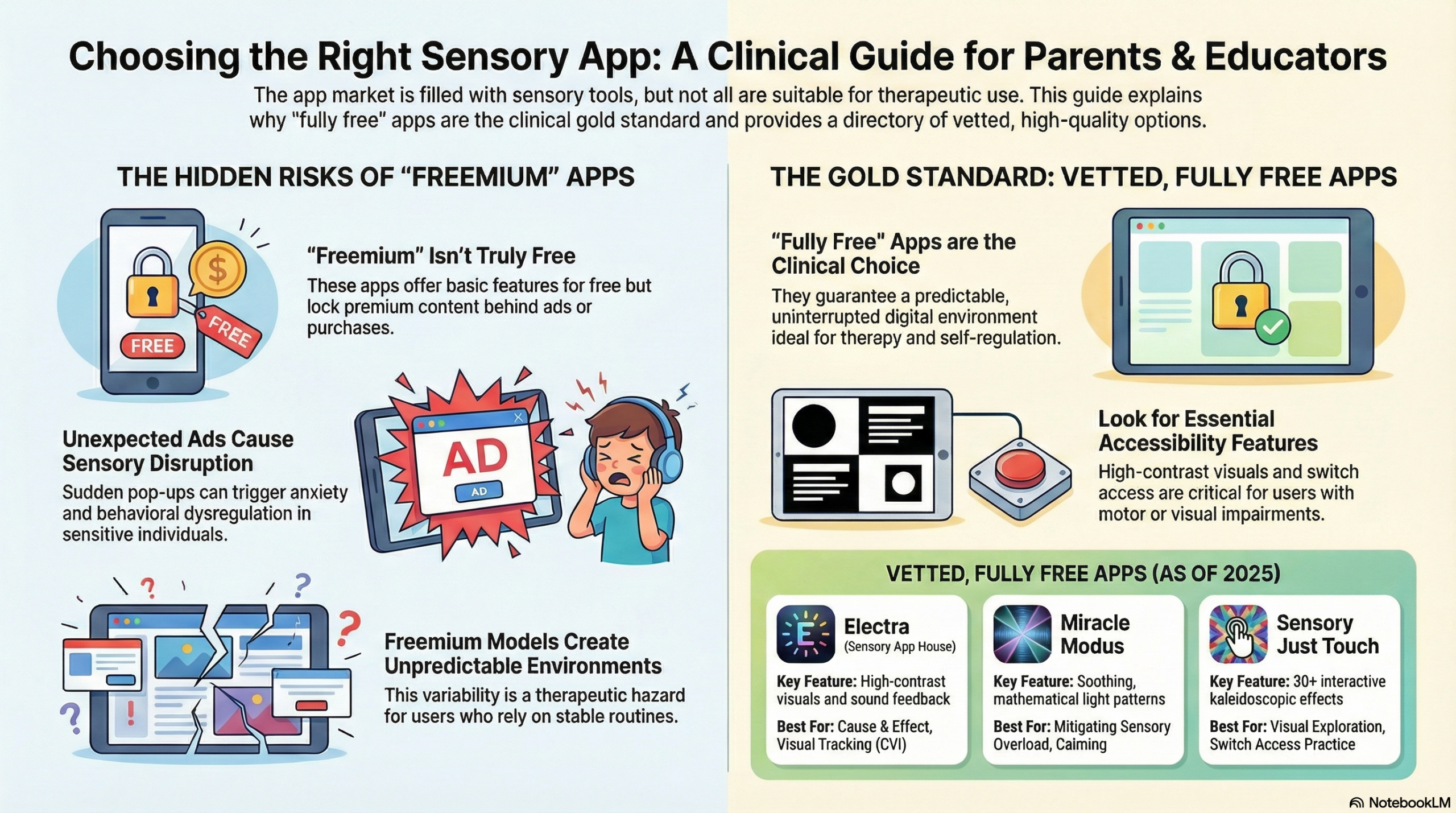
Choosing the right digital tool for therapeutic use is a critical strategic decision, particularly for individuals with sensory sensitivities. The app’s design and business model can either support or undermine its intended purpose, making the distinction between different types of “free” apps paramount.
A “Fully Free” app contains no advertisements, no in-app purchases, and no subscriptions. This model guarantees a predictable, stable, and uninterrupted user experience. The suite of applications from Sensory App House, including Electra, Magma, and Just Touch, are prime examples of this gold standard. They are designed to be “grab and go” tools, free from any distracting or disruptive commercial elements.
In contrast, the “Freemium” model offers a basic version of the app at no cost but includes disruptive advertisements or persistent prompts for in-app purchases to unlock full functionality. While this is a common monetization strategy for popular apps like the Toca Boca or Dr. Panda series, it can be a poor fit for many autistic children and children with sensory processing differences.
In practice, unexpected ads or paywalls act as jarring interruptions. For a child who is already overloaded, a sudden sound, flashing banner or purchase prompt can make things worse. They shatter the predictable and safe digital environment necessary for a user to achieve regulation, learn cause-and-effect, or engage in calming activities.
For these clinical reasons, this directory exclusively features apps that are fully free. Our vetting process ensures that every app listed provides a safe, predictable, and effective digital environment for therapeutic use.
——————————————————————————–
Quick Summary The best free sensory apps in 2026 stand out for their calm design, accessibility, and commitment to a zero-cost, ad-free model. Top selections include Miracle Modus for its authentic design by an autistic creator to mitigate overload, Sensory Electra for its powerful and immediate cause-and-effect stimulation, and Fluidity HD for its simple, calming, and accessible visuals.
Best Overall: Miracle Modus Created by an autistic developer, this app was specifically designed as a tool to mitigate sensory overload. Its use of hypnotic, mathematically-patterned rainbow lights and soft, soothing bells is meant to be calming. Note: it has not been updated since 2013, and the App Store warns that the developer needs to update it for current iOS versions, so it may not open on newer devices.
Best for Cause & Effect: Sensory Electra This app is an essential tool for teaching cause-and-effect. It provides immediate, high-contrast visual and auditory reinforcement upon touch. Crucially, it is also fully switch-accessible, making it an invaluable resource for early learners and users with significant motor or coordination impairments.
Best for Calming: Fluidity HD A beautiful and simple app where flowing, vibrant colors are controlled by any touch on the screen. Its elegance lies in its accessibility; because it does not require precise fine motor skills, it is a perfect calming tool for sensory exploration and relaxation for a wide range of users.
Quick-Reference Data Table
The table below summarizes our top recommendations, with our three top picks in bold. Prices and availability were checked on the US App Store in November 2026.
| Resource Name | Best For… | Cost (Nov 2026) | Platform |
| Miracle Modus | Mitigating sensory overload | Free | iPad/iPhone (last updated 2013; may not open on newer iOS) |
| Sensory Electra | Cause-and-effect stimulation | Free, no ads | iPad/iPhone |
| Fluidity HD | Calming visual feedback | Free; full version $1.99 in-app | iPad |
| Sensory Magma | Calming lava lamp effect | Free | iPad/iPhone |
| Sensory Plazma | Simple visual stimulation | Free, no ads | iPad/iPhone |
| Sensory iMeba | Immersive visual interaction | Free, no ads | iPad/iPhone |
| Draw with Stars | Relaxing sensory drawing | Free, no ads | iPad/iPhone |
| Baby’s Musical Hands | Auditory & visual touch play | $0.99 (not free) | iPad/iPhone |
| Sensory Just Touch | Interactive visual pattern play | Free, no ads | iPad/iPhone, Apple-silicon Mac |
| Finger Paint with Sounds | Creative expression & exploration | Free | iPad |
| Sensory Splodge | Splatter paint effects | Free | iPad/iPhone |
| ChatterPix Kids | Creative expression & communication | Free, no ads (Khan Academy) | iOS, Android |
| Breathe, Think, Do with Sesame | Emotional regulation & breathing (ages 2–5) | Free | iOS, Android |
| Seeing AI | Narrating the world for visual impairment | Free (Microsoft) | iOS, Android |
| Sensory Harbor (made by 101Autism) | Gentle no-timer calming game | Free | Any web browser |
| Pocket Pond, Color Dots, Fingerworks | Removed from earlier versions of this list | — | No longer available |
——————————————————————————–
The Detailed List: Sensory Apps, Checked November 2026
We re-checked each App Store listing in November 2026 for price, ads and in-app purchases. We have not run formal tests, and listings change, so check before you install. Three apps from earlier versions of this list (Pocket Pond, Color Dots and Fingerworks) are no longer available, and Baby’s Musical Hands now costs $0.99. Most apps here are iPad/iPhone apps; Android versions are noted where we could confirm them.
Visual Calming & Regulation
1. Miracle Modus
- What it is: A unique app developed by an autistic person that provides hypnotic, mathematically-patterned rainbow lights and soft, soothing bell sounds.
- Why we recommend it: This is a purpose-built tool designed by someone with lived experience to mitigate sensory overload and provide comfort. Some users describe it as calming, but there is no research on this specific app, and it may not run on the newest iPhones and iPads (last updated 2013).
- Key Features:
- Soothing, patterned displays of light and sound.
- Interactive modes that respond to touch and gravity.
- Customizable settings for sounds, color palettes, and display modes.
- Best for: Managing sensory overload & anxiety.
- Clinical Application Tip: Before a potentially overstimulating event (like a school assembly or grocery trip), have the user spend five minutes with this app to “pre-regulate” their sensory system, which can increase their capacity to cope.
- Platform: iOS, Android
2. Fluidity HD
- What it is: A beautiful and calming sensory app where any touch on the screen controls the flow of vibrant, fluid-like colors.
- Cost note: Free to download, but the full version is a $1.99 in-app purchase (iPad, last updated 2017).
- Why we recommend it: Its accessibility makes it suitable for users with minimal or no fine motor skills. It provides wonderful visual feedback for cause-and-effect learning without demanding precision, creating a relaxing and engaging experience.
- Key Features:
- Beautiful, flowing color simulation resembling water or smoke.
- Responds to any touch, anywhere on the screen.
- Creates a calming and engaging visual experience.
- Best for: Relaxation & limited fine motor control.
- Clinical Application Tip: Use this on a large tablet in a darkened, quiet room to create an immersive, low-demand sensory space for de-escalation.
- Platform: iOS
3. Sensory Magma
- What it is: A simple, calming app that generates relaxing, lava lamp-style visual effects that respond to touch.
- Why we recommend it: For moments requiring gentle visual stimulation without complex interactions, Sensory Magma serves as a fantastic “grab and go” tool for calming. It contains no ads or settings that could disrupt the user, ensuring a predictable experience.
- Key Features:
- Generates lava-style flowing effects.
- Calming and relaxing visual feedback.
- No settings screen or in-app purchases.
- Best for: Calming visual stimulation.
- Clinical Application Tip: Use this app as a visual timer or waiting tool. The slow, predictable movement of the “lava” can help make waiting periods feel less abstract and more manageable for users with anxiety or time-perception challenges.
- Platform: iOS, Android
4. Pocket Pond
- What it is: A digital pond with fish that swim around, responding to touch with the sound of water and realistic movement.
- Why we recommend it: The combination of gentle water sounds and the visual effect of fish swimming away from a touch provides a very calming sensory experience. Note: As of our last verification, this app is no longer listed on major app stores but is included for its historical value and for users who may still have it on older devices.
- Key Features:
- Realistic pond with swimming fish and interactive water.
- Touch creates water sounds and ripples.
- Users could add elements like lily pads and dragonflies.
- Best for: Calming auditory & visual input.
- Platform: No longer available
5. Sensory Plazma
- What it is: A simple visual stimulation app from Sensory App House that responds to touch with plasma-like effects.
- Why we recommend it: Like other apps from this developer, Plazma is designed for simplicity and therapeutic use. It provides clear visual input, is switch accessible, and is free from any distracting ads or in-app purchases, making it a reliable tool for focused sensory work.
- Key Features:
- Interactive visual input with plasma effects.
- Designed for people with special/complex needs.
- Switch accessible and ad-free.
- Best for: Simple visual stimulation.
- Platform: iOS, Android
6. Sensory iMeba
- What it is: An immersive and relaxing app where users interact with colorful, amoeba-like shapes on screen.
- Why we recommend it: This app provides a calming, immersive visual experience. While it is less reactive than other Sensory App House apps and may require more precise touch, it can be a good option for users working on motor accuracy in a low-pressure environment.
- Key Features:
- Simple, stimulating, and immersive visuals.
- Designed for relaxation and users with special needs.
- Ad-free and switch compatible.
- Best for: Immersive visual interaction.
- Platform: iOS, Android
7. Draw with Stars
- What it is: A simple sensory drawing app where stars appear with musical sounds as you move your finger along the screen.
- Why we recommend it: This app offers a relaxing and gentle sensory experience that can be used for creative play or to practice pre-writing skills like letter shapes. The cause-and-effect is clear and rewarding, with stars flying away when tapped or when the device is shaken.
- Key Features:
- Draw lines of stars with your finger.
- Musical sounds enhance the experience.
- Simple interactions: tap a star to make it fly away.
- Best for: Relaxing sensory drawing.
- Platform: iOS
Cause & Effect Learning
8. Sensory Electra
- What it is: A simple, high-contrast visual stimulation app where touch or external switch activation creates immediate on-screen electrical effects.
- Why we recommend it: An ideal tool for teaching cause-and-effect and introducing switch operation, its “grab and go” design with no settings screen prevents unintentional changes. This makes it perfect for clinical, classroom, and home use without interruption.
- Key Features:
- High-contrast visuals ideal for users with visual impairments.
- Immediate sound and graphic reinforcement for user input.
- Fully switch accessible for users with motor impairments.
- Best for: Cause-and-effect learning & switch access.
- Clinical Application Tip: Pair this app with a single large accessibility switch (like a ‘big red button’) to establish the foundational cognitive link between physical action and digital effect for early learners or users with significant motor impairments.
- Platform: iOS, Android
9. Baby’s Musical Hands
- What it is: A colorful and musical app where any touch on the screen plays a piano sound accompanied by bright visuals.
- Cost note: $0.99 on the App Store, so not free (iPad/iPhone, last updated 2017).
- Why we recommend it: With high accessibility for users with less developed fine motor skills, it provides immediate auditory and visual feedback for any touch. This makes it a simple and effective tool for early cause-and-effect play.
- Key Features:
- Responds to any touch on the screen.
- Plays piano sounds with corresponding visual effects.
- Simple, intuitive interface for young learners.
- Best for: Auditory & visual touch play.
- Clinical Application Tip: Position the tablet on the floor and encourage a baby or young child to interact with their feet. This helps develop body awareness and demonstrates cause-and-effect using different parts of the body.
- Platform: iOS, Android
10. Color Dots
- What it is: An app where colorful circles float around the screen, encouraging the user to track them with their eyes and touch them to make them ‘pop’.
- Why we recommend it: This app is excellent for practicing eye-tracking skills in a simple and motivating format. The auditory feedback of the ‘pop’ provides clear reinforcement for successful interaction. Note: As of our last verification, this app is no longer listed on major app stores but is included for its historical value and for users who may still have it on older devices.
- Key Features:
- Floating circles encourage visual tracking.
- Touch interaction results in a ‘popping’ sound.
- The number of circles increases as you play.
- Best for: Eye-tracking practice.
- Platform: No longer available
Interactive & Creative Expression
11. Sensory Just Touch
- What it is: A fun effects app that creates incredible visual, kaleidoscopic, and entrancing patterns in response to touch.
- Why we recommend it: This app offers a wide variety of engaging visual effects, from morphing a user’s face in a hall of mirrors to flying through colorful tunnels. It is fully switch accessible and completely free of ads or settings, ensuring an uninterrupted experience.
- Key Features:
- Over 30 different touch effects.
- Kaleidoscopic patterns, infinity tunnels, and mirror effects.
- Fully switch accessible.
- Best for: Interactive visual exploration.
- Platform: iOS, macOS
12. Finger Paint with Sounds
- What it is: A digital finger-painting app that allows users to explore touch with corresponding colors, sounds, or music.
- Why we recommend it: It provides an accessible platform for creative expression and sensory exploration. Its support for both multi-touch and single-touch options, along with switch accessibility, makes it adaptable to a wide range of user abilities.
- Key Features:
- Paint with different colors and sounds.
- Multi-touch and single-touch options available.
- Fully switch accessible.
- Best for: Creative expression & switch-accessible art.
- Clinical Application Tip: Project the app onto a large surface or smartboard to transform the activity into a collaborative, gross-motor experience where students can “paint” with their whole bodies.
- Platform: iOS
13. Sensory Splodge
- What it is: A creative effects app that allows users to create splatter paint effects on a glowing background.
- Why we recommend it: For fun and visually engaging creative expression, this app is a great choice. Beyond paint splatters, it also includes effects with fish, butterflies, and balloons, offering variety and novelty for users.
- Key Features:
- Splatter and splodge paint effects.
- Includes additional visual themes like fish and butterflies.
- Simple touch-based interaction.
- Best for: Creative play & visual fun.
- Platform: iOS
14. ChatterPix
- What it is: A fun app that allows users to take a picture of any object, draw a mouth on it, and record their voice to make it talk.
- Why we recommend it: This is an excellent tool for encouraging creative expression, communication, and oral language practice. It allows users to create playful messages or even deliver book reports in a highly motivating and fun way.
- Key Features:
- Animate any picture to make it talk.
- Simple to draw a mouth and record audio.
- Save and share the created videos.
- Best for: Creative communication practice.
- Clinical Application Tip: Use this app to help non-verbal or shy students participate in class activities. They can animate a picture of an animal or a drawing and record their answer or comment, reducing the social pressure of speaking directly.
- Platform: iOS, Android
15. Fingerworks
- What it is: A sensory app where the screen is filled with tiny, swimming lines that can be moved and shaped into patterns with touch.
- Why we recommend it: It offers a unique tactile and visual experience, allowing users to create patterns through direct manipulation. This can be a very calming and focusing activity for individuals who enjoy structured visual input. Note: As of our last verification, this app is no longer listed on major app stores but is included for its historical value and for users who may still have it on older devices.
- Key Features:
- Interactive field of tiny, moving lines.
- Allows for the creation of patterns via touch.
- Engaging visual sensory feedback.
- Best for: Calming visual-motor engagement.
- Platform: No longer available
Cognitive & Emotional Skill-Building
16. Breathe, Think, Do with Sesame
- What it is: A regulation-focused app where a Sesame Street monster guides users through problem-solving and breathing activities.
- Why we recommend it: By teaching foundational emotional regulation strategies in an engaging format, this app is a standout. The ability to personalize encouraging phrases helps tailor the experience to the individual child, making the calming techniques more effective.
- Key Features:
- Guided breathing and regulation activities.
- Interactive problem-solving scenarios.
- Personalized encouraging phrases can be recorded.
- Best for: Emotional regulation & breathing exercises.
- Clinical Application Tip: Record the child’s own voice or a parent’s voice for the personalized phrases. Hearing a familiar, trusted voice can significantly enhance the effectiveness of the calming prompts during moments of distress.
- Platform: iOS, Android
Specialized Accessibility Tools
17. Seeing AI
- What it is: A free app from Microsoft that uses artificial intelligence to narrate the world for individuals with a visual impairment.
- Why we recommend it: While not a traditional sensory app, it is a powerful tool for processing sensory information. It can read text, recognize faces, describe scenes, and identify products, making the environment more accessible and understandable for users with visual impairments.
- Key Features:
- Narrates text detected by the smartphone camera.
- Recognizes faces and describes people’s characteristics.
- Reads barcodes to identify products.
- Best for: Environmental information access for visual impairment.
- Clinical Application Tip: Use the “Scene” channel to help a student with social communication challenges interpret their environment. The AI’s description of a room’s layout or the general mood of a scene can provide valuable context they might otherwise miss.
- Platform: iOS
——————————————————————————–
Frequently Asked Questions about Sensory Apps
This section addresses common questions from parents, educators, and therapists when selecting digital tools for children with special needs, providing clarity on best practices for safe and effective implementation.
Q: Why are ads or in-app purchases a problem in sensory apps?
A: Unexpected advertisements or purchase prompts can be jarring for individuals with sensory sensitivities. They disrupt the predictable, controlled environment required for emotional and sensory regulation. This sudden, unwanted stimulus can introduce unnecessary cognitive load and potentially cause sensory overload, anxiety, and distress, undermining the app’s therapeutic purpose.
Q: Are these apps available for both Android and Apple (iOS) devices?
A: Most apps on this list are iPad/iPhone apps. ChatterPix Kids, Breathe, Think, Do with Sesame and Seeing AI also have Android versions. We could not confirm current Android versions of the Sensory App House apps or Miracle Modus, so search Google Play before you plan around them. Sensory Harbor runs in any web browser. It is always best to check the app store on your specific device to confirm availability.
Q: Can these apps really help a child calm down during a moment of distress?
A: Sometimes. There is very little research on specific sensory apps, so treat them as one calm-down option, not a treatment, keep sessions short and watch how your child responds. Many of these apps are designed to be soothing. Apps like Miracle Modus and Fluidity HD use predictable, patterned visuals and gentle, repetitive sounds to help quiet the mind. This type of input can provide a calming focal point, offer a safe distraction from anxious thoughts or overwhelming external stimuli, and support the user in practicing emotional self-regulation.
——————————————————————————–
📥 Download this List
Need to print this for a client, student, or patient?
Use your browser’s Print option (or “Save as PDF”) to print this page. The older 2025 PDF version is out of date, so we no longer link to it.
Discover more from Living with Autism
Subscribe to get the latest posts sent to your email.