Visual Recipes for Non-Verbal Learners: How to Create Picture-Based Cooking Guides
- Introduction: Cooking Without Words
- What is a Visual Recipe?
- The 3 Core Components
- Why Visual Recipes Work for Autism
- Step-by-Step: How to Create Your Own Visual Recipe
- Method 1: The “Real Life” Method (Best for Beginners)
- Method 2: The Digital Icon Method (Faster)
- Example: The “No-Bake Energy Ball” Visual Recipe
- Part 1: Ingredients (Gather These)
- Part 2: Actions (Do This)
- Teaching Strategy: Backward Chaining
- Tools & Resources to Get Started
- References
Introduction: Cooking Without Words
Imagine trying to assemble IKEA furniture using only a text manual written in a language you don’t speak fluently. That is what a traditional written recipe looks like to many autistic children.
For learners with executive function challenges, dyslexia, or those who are non-speaking (non-verbal), a wall of text says: “This is too hard. Give up.”
But the kitchen is one of the best places to build independence, sequencing skills, and confidence. The secret isn’t simpler food; it’s simpler instructions.
Enter the Visual Recipe: A step-by-step guide that uses images, icons, and clearly defined actions to bypass language barriers and speak directly to the brain’s visual processing center.
What is a Visual Recipe?
A visual recipe breaks cooking down into three distinct, visually separated categories. It removes the “guesswork” of paragraphs.
The 3 Core Components
- Visual Ingredient List (The “What”):
Instead of a list like “1 cup oats,” you show a picture of the oats next to a picture of the measuring cup.
Goal: The child can gather items independently by matching the picture to the object in the pantry. - Visual Tools List (The “How”):
Pictures of the specific bowl, spoon, or pan needed.
Goal: Reduces frustration (“Where is the spoon?”) before starting. - Action Steps (The “Do”):
Each action is a single frame. “Mix,” “Pour,” “Roll.”
Goal: Breaks a complex task (making cookies) into manageable, non-threatening micro-tasks.
Why Visual Recipes Work for Autism
- Reduces Cognitive Load: The brain processes images 60,000 times faster than text. Your child doesn’t have to “decode” the word M-I-X; they just see the spoon in the bowl and do it.
- Promotes Independence: A parent often hovers, saying “Now do this, now do that.” A visual recipe allows the child to look at the paper, not the parent. They become the chef; you become the assistant.
- Teaches Sequencing: “First, Next, Then” logic is hard for many neurodivergent brains. Visual recipes make linear time physical and visible.
Step-by-Step: How to Create Your Own Visual Recipe
You don’t need expensive software. You can make these with a smartphone and a printer.
Method 1: The “Real Life” Method (Best for Beginners)
This is the most effective method because it uses the exact items your child will see.
- Gather Ingredients: Put the peanut butter jar, the oats, and the honey on the counter.
- Take Photos: Snap a clear photo of each item against a plain background.
- Capture Actions: Have a sibling or yourself demonstrate the action (pouring, mixing). Take a photo of just the hands doing the task.
- Print & Laminate: Put the photos in a Word document or Google Doc. Print them out. Laminate the sheet (kitchens are messy!).
Method 2: The Digital Icon Method (Faster)
Use free tools to drag-and-drop standard icons.
- Canva: Search for “Recipe Card” templates and use their “Elements” library to find icons for “bowl,” “spoon,” “apple.”
- LessonPix / Boardmaker: Paid software specifically for special education, with thousands of standardized PECS (Picture Exchange Communication System) symbols.
Example: The “No-Bake Energy Ball” Visual Recipe
This is the perfect starter recipe. No stove, no knives, safe-to-eat batter (sensory-friendly).
Part 1: Ingredients (Gather These)
![Visual Ingredient List for Energy Balls]
- [Picture of Oats] – 1 Cup
- [Picture of Peanut Butter] – 1/2 Cup
- [Picture of Honey] – 1/3 Cup
- [Picture of Chocolate Chips] – 1/2 Cup
![How to Create a Visual Recipe text[Picture of oats: 1 cup] + [Picture of peanut butter: 1/2 cup] + [Picture of honey: 1/3 cup] + [Picture of chocolate chips: 1/2 cup]](https://101autism.com/wp-content/uploads/2025/12/How-to-Create-a-Visual-Recipe-scaled.png)
Part 2: Actions (Do This)
![Visual Action Steps Icons]
- POUR oats, peanut butter, honey, and chips into the bowl.
- MIX with a big spoon until sticky. (Visual cue: Show the mixed dough)
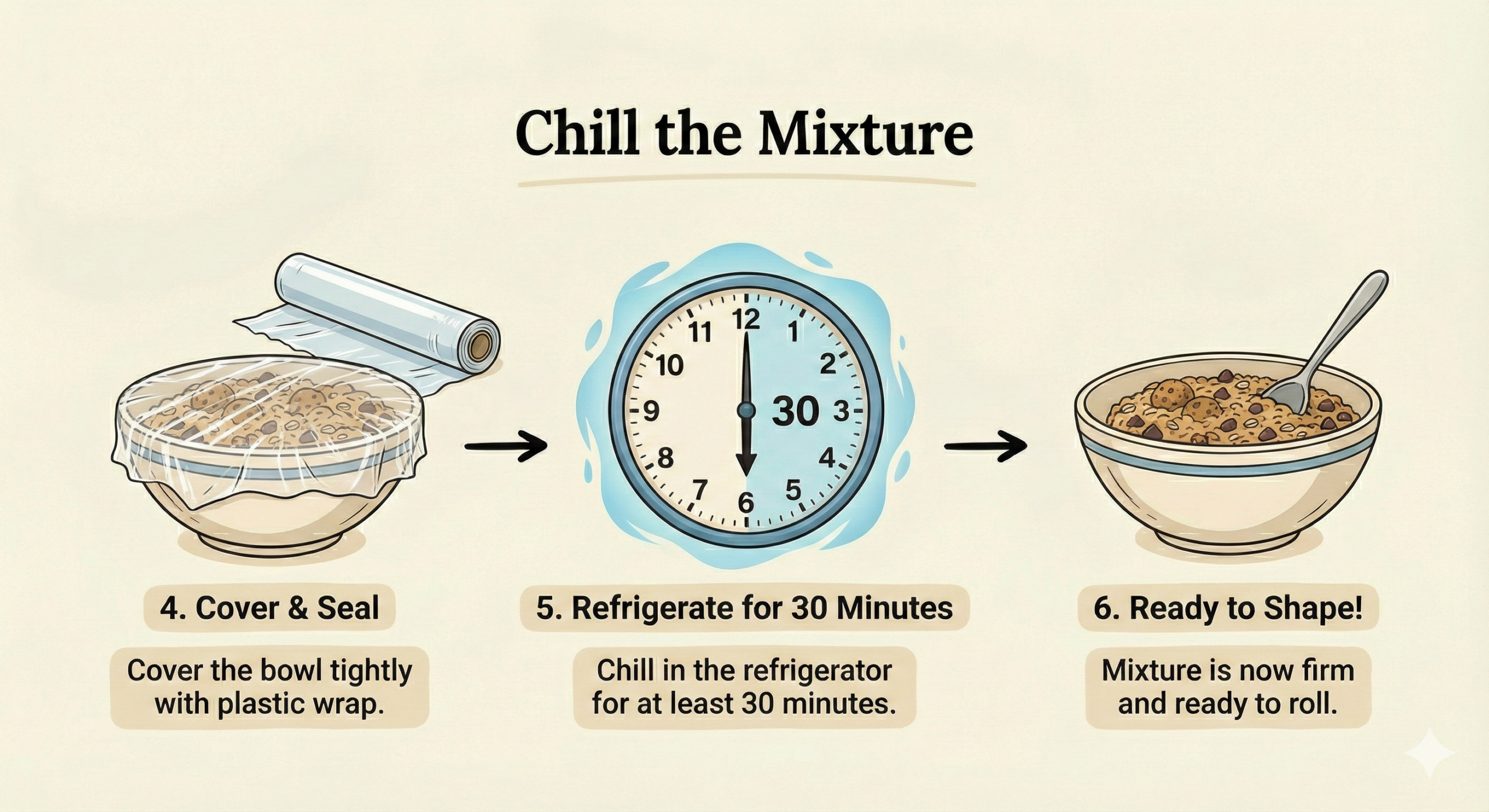
- ROLL dough into small balls with your hands. (Sensory warning: This is sticky!)
- CHILL in the fridge for 20 minutes. (Use a visual timer!)
Teaching Strategy: Backward Chaining
If your child is overwhelmed even with pictures, use Backward Chaining.
- You do steps 1-3: You gather, pour, and mix everything.
- Child does Step 4: The child only rolls the balls and eats them.
- Next time: You do steps 1-2. Child does Mix and Roll.
Why this works: The child always gets the immediate reward (eating) after their task. It builds success momentum.
Tools & Resources to Get Started
- Canva (Free): Excellent for making clean, colorful recipe cards.
- Teachers Pay Teachers (TPT): Search “Visual Recipes Autism” for pre-made packs ($3-$5).
- Visual Timers: Essential for “baking” or “chilling” steps so the child can “see” time passing.
This article is part of our Neuro-Kitchen series.
Previous Post: Safe-Food Archetypes: Texture vs. Flavor
Next Up: Kitchen Gadget Reviews: The Quietest Blenders & Timers
This post is part of our wider series on creating a calm home environment. For a full room-by-room breakdown, check out The Sensory-Friendly Kitchen Guide https://101autism.com/the-sensory-friendly-kitchen-guide/.
References
The Autism Helper. “Visual Recipe Round Up.”
Especially Education. “Visual Recipes: What They Are & How to Use Them.”
National Autistic Society. “Visual Supports.”

Discover more from Living with Autism
Subscribe to get the latest posts sent to your email.